
Pasture
A personal medication tracker that logs doses, enforces your own dose limits, and reminds you — without getting in the way.
Download on the App StoreSee it in action
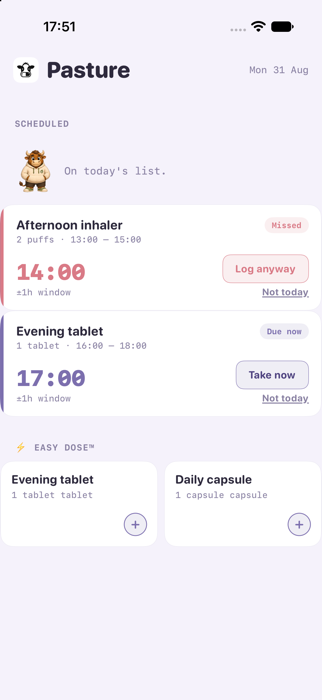
Dashboard
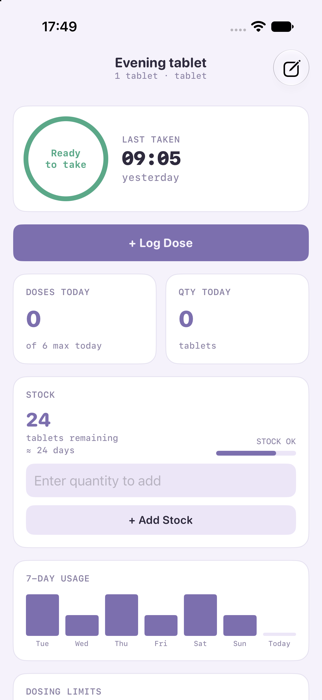
Medication detail
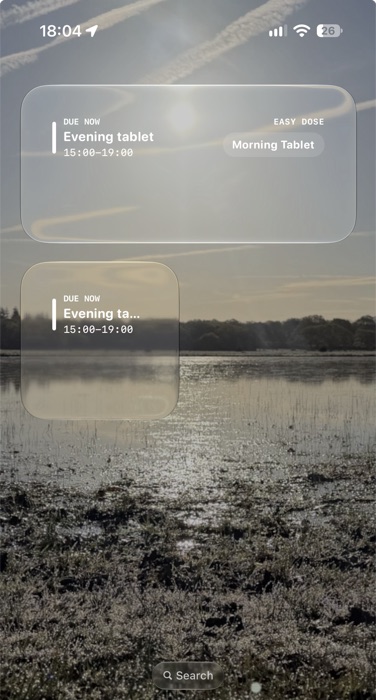
Home Screen widgets
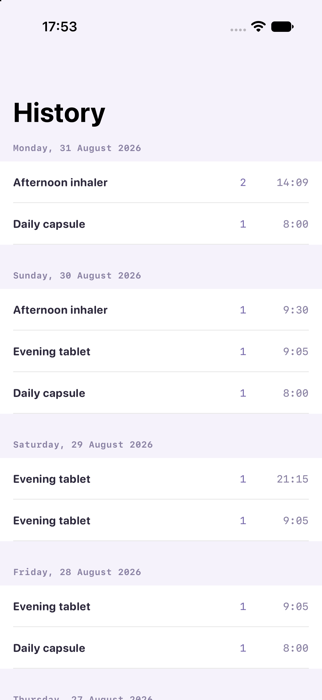
History
How Pasture works
Dose logging & limits
Set a minimum gap between doses and a maximum per day for each medication. Pasture tracks what you've taken and tells you plainly when it's too soon for another, or when you've hit today's limit.
Easy Dose™
For medications you take often, one tap logs a dose — from the app, a Home Screen widget, or the Lock Screen, even while your phone is locked. The button stays put afterwards, ready for next time — it's a repeatable quick-log, not a one-off checklist item.
Scheduled reminders
Set a time and a window for a dose, and Pasture's Dashboard shows what's due, what's overdue, and what you missed yesterday — kept separate so today's dose never gets buried under yesterday's.
Built to fit your day
Day, Evening, and Night themes — Night is deliberately low-brightness and minimal, for logging a dose at 3am without a screen full of glare.
Frequently asked questions
Do I need to create an account?
No. There's no sign-up and nothing to register, so Pasture works the moment you open it.
Does it work without an internet connection?
Yes, Pasture is offline-first. Your medication data lives on your device and doesn't need a network connection to work.
Is my data private?
By default, your data stays entirely on your device. An optional, off-by-default iCloud Sync keeps it available across your own devices via your own private iCloud account, and Lucrative Kine never sees or stores it. See the Privacy Policy for details.
What happens if I miss a dose?
Pasture shows it as missed rather than hiding it, and yesterday's unresolved doses get their own catch-up section, kept separate from what's due today.
Is Pasture medical advice?
No. Pasture tracks and reminds based on limits you set yourself, and it doesn't determine whether a medication is right or safe for you. Always follow guidance from a healthcare professional.
What platforms is it available on?
Pasture is a native iOS app, available on the App Store. Submitted for Apple's review, so if the link says it's not available yet, it's still awaiting approval.
Do I use the guided setup, or fill in the form myself?
Whichever you prefer. The guided setup walks you through one question at a time and it is a good choice for your first medication, or if you're not sure what to fill in. Filling in the form yourself is the same fields all at once, and it is faster once you know what you want to enter. Either way ends up creating exactly the same kind of medication.
Can I mark two medications as not to be taken together?
Yes. When adding or editing a medication, you'll see a "Can't take this with" list of your other medications, and you just tap any of them to mark a clash. You only need to mark it on one side, because Pasture checks both directions automatically, and it'll warn you if you try to log one shortly after the other. This is only ever based on what you've told it, not a real drug-interaction database.
I want to remember to take something once a day, but the exact time doesn't matter, how?
Leave "Maximum per day" blank and set "Minimum hours between doses" to anything less than 24, say 20 hours. So if you take it at 2pm one day, you'll be free to take it again as early as 10am the next day, rather than being locked to 2pm or blocked by a separate once-per-calendar-day limit, because there isn't one.
What's the difference between Easy Dose and a Schedule?
A Schedule reminds you at a set time and expects a specific quantity, like take 2 tablets at 8am. Easy Dose is a one-tap button for medications you take often, with no fixed time. A medication can only ever have one or the other, so turning on Easy Dose isn't available while a medication has a schedule, and it works the other way round too.
My dose is more than one tablet, will Easy Dose log the right amount?
No, Easy Dose always logs exactly 1 unit no matter what your usual dose size is. If a dose is more than one tablet, it's better to log it from the medication's own screen instead, or set up a Schedule with the right quantity, so your stock count stays accurate.
How does stock tracking work?
Every logged dose deducts from the stock count automatically, but it's only ever as accurate as what you actually log, so a dose taken without opening the app won't be reflected. You can correct the number, or record a refill, at any time using the Add Stock and Remove Stock buttons on the medication's screen. You can also set a low stock threshold, like alert me at 10 left, and Pasture flags the medication once it drops to or below that number.
Why does my Apple Watch show nothing?
The Watch app can only see medications that have synced via iCloud, so check that iCloud Sync is turned on in Settings, on your phone.
Why did I get a notification confirming an Easy Dose tap?
Widget and Lock Screen taps don't show any confirmation on screen, so if there's a chance a tap was accidental, Pasture might send a quick notification so you can undo it from the app.
Can I export or back up my data?
Yes. Export saves everything, your medications, schedules and dose history, to a JSON file you control, which is handy as a backup or for moving to a new device. Importing a backup replaces everything currently in the app, so it's worth exporting first if you want to keep what's already there.
What happens if I delete a medication?
It's permanent, and it also deletes all of its logged dose history, so there's no undo.
What does the "Auto" theme mode do?
It switches between Day, Evening, and Night automatically through the day, and it gradually learns your own routine from when you switch manually.
How do I manage or cancel my subscription?
In the app, just go to Settings → Manage Subscription and it'll open Apple's own subscription page directly. You can cancel any time through your Apple Account subscription settings, and if you cancel during your free trial you won't be charged.